
Tuto: Using the data import file
The tutorial is based on the import model of the database Base Impacts. The differences between the various databases will be indicated.
The import file allows importing multiple environmental activities in a single operation.
File structure
The file contains several tabs:
- Activity import model -> Main sheet to complete for the import
- Waste type-List -> Information sheet
- Families-Materials-List -> Information sheet
- Families-Processes-List -> Information sheet

In this tutorial, we will see how to fill in the first tab Activity import model by proceeding column by column.
A. Data type
Mandatory field
The possible values are as follows :
- Material
- Process
- Transport
- End of life
It is possible to associate multiple types of data with a single data entry. Each type of data must be separated by “;”. Here are the available Data types fill options :
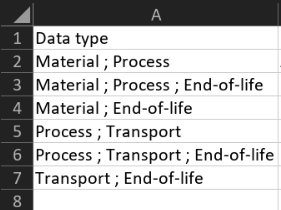
It is not possible to have both the Material and Transport data types at the same time.
B. Organisation name
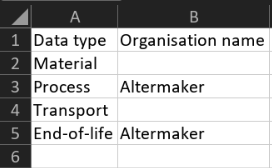
Mandatory field if you are a consultant of the organisation
Except for consultants, this field can remain empty or be filled with the exact name of your organisation.
C. English name
Mandatory field
The data name must be unique. In case of non-compliance, the error message will be displayed during import.
D. French name
Optional field
The name of the data must be unique. Otherwise, an error message will be displayed during the import.
E. UUID
Optional field
If the universally unique identifier (UUID) is not provided, it will be automatically generated during the import.
Using the same UUID as the public data already present in the database, a data entry with the dynamic link will be created. This will allow for automatic updates of the data each time the database is updated.
F-G. English and French synonyms
Optional fields
Each data synonym must be separated by “;”. There is no limit to the number of synonyms. Here is an example of filling:

Having the synonym associated with the data allows it to be found in the Database interface, or during the LCA modeling, not only by its name but also by the synonym.
H. Unit
Mandatory field
You can provide the unit of your choice.
Note: only data expressed in 't.km', 't*km', 'metric ton*km', and 'ton*km' will appear in the transport phases Supply and Distribution.
I. Unit mass
Optional field
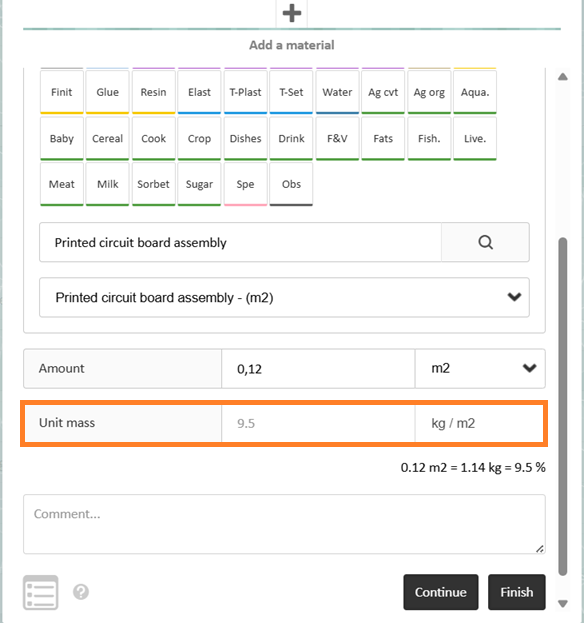
The unit mass may be specified for data of type Material when its unit differs from kg.
If your material is mass-based and the unit is indeed kg, entering the unit mass is unnecessary.
The unit mass associated with a data entry allows for pre-filling the corresponding field when adding a raw material in the LCA modeling.
J. Category
Mandatory/optional field
- For the Data Types Material and Process this field is mandatory. The list of categories can be found in the tab "Families-Materials-List" and "Families-Processes-List" of the same Excel file.
- For the Data Types Transport and End of life this field is optional.
K-L. Start and End of activity
Optional fields
They are used to specify the scope of the data.
Text content is expected in these fields.
M-N. English and French Comment
Optional fields
Text content is expected in these fields.
O. Period
Optional field
The date format used to indicate the validity period of the data is as follows:
YYYY-MM-DD -> YYYY-MM-DD
For example: 2022-04-30 -> 2026-08-31.
P-AB. Environmental indicators
Optional fields
P-AM columns for the ecoinvent 3.8 database
P-AL columns for the ecoinvent 3.9.1, ecoinvent 3.10.1 databases
P-CG columns for the ecoinvent 3.11, ecoinvent 3.12 databases
P-V columns for the FD EO1-008 database
Impact values must be provided in numerical format. The value can be negative or equal to 0. The field may also be left blank.
AC-AD. Electricity and Heat
Optional fields
Data of type Material, Process, and End of life may include aggregated electricity and/or heat.
In both cases, the quantity is provided in numerical format. This quantity will be automatically considered during the LCA project modeling. During modeling, you will only need to select the country and the heat, as shown in the screenshot below.
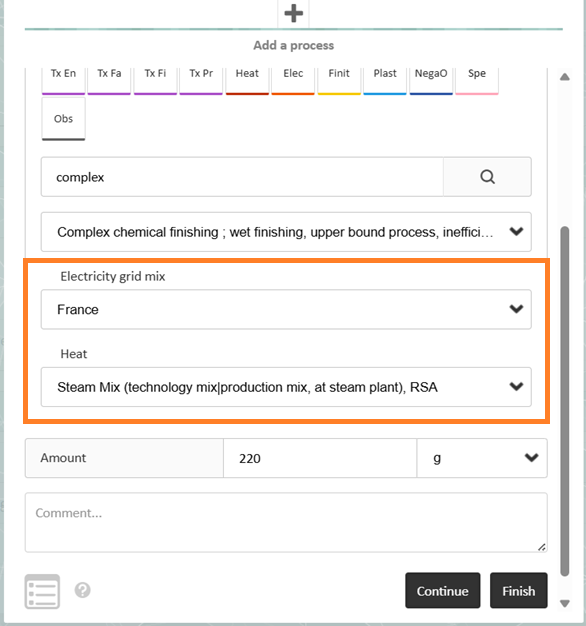
Note: the unit of electricity and heat is Megajoules (MJ).
AE. Waste type
Mandatory field
Only for the Base Impact database and column V for the FD E01-008 database
A waste type must be defined only for the data type Material. The list of categories is available in the "Waste type-List" tab of the same Excel file.
Assigning a material to a waste type allows for managing the End of Life phase. If, during the life cycle modeling, you select automatic end of life for your material, the scenario will be determined using a waste type.